

The microVM that runs in the browser.


BrowserPod is a microVM that runs in the browser. It boots a Linux-like kernel in WebAssembly, and on it runs Node.js, Rust and C++ applications, with Python in preview. Each Pod comes with a full command-line environment including npm, pnpm, git and bash. It has a local filesystem, which can persist across sessions, and reaches the internet through the browser fetch or through BrowserPod Edge, which adds inbound Portals and TCP. Everything runs on the user’s own device, with zero latency.
npm i @leaningtech/browserpod 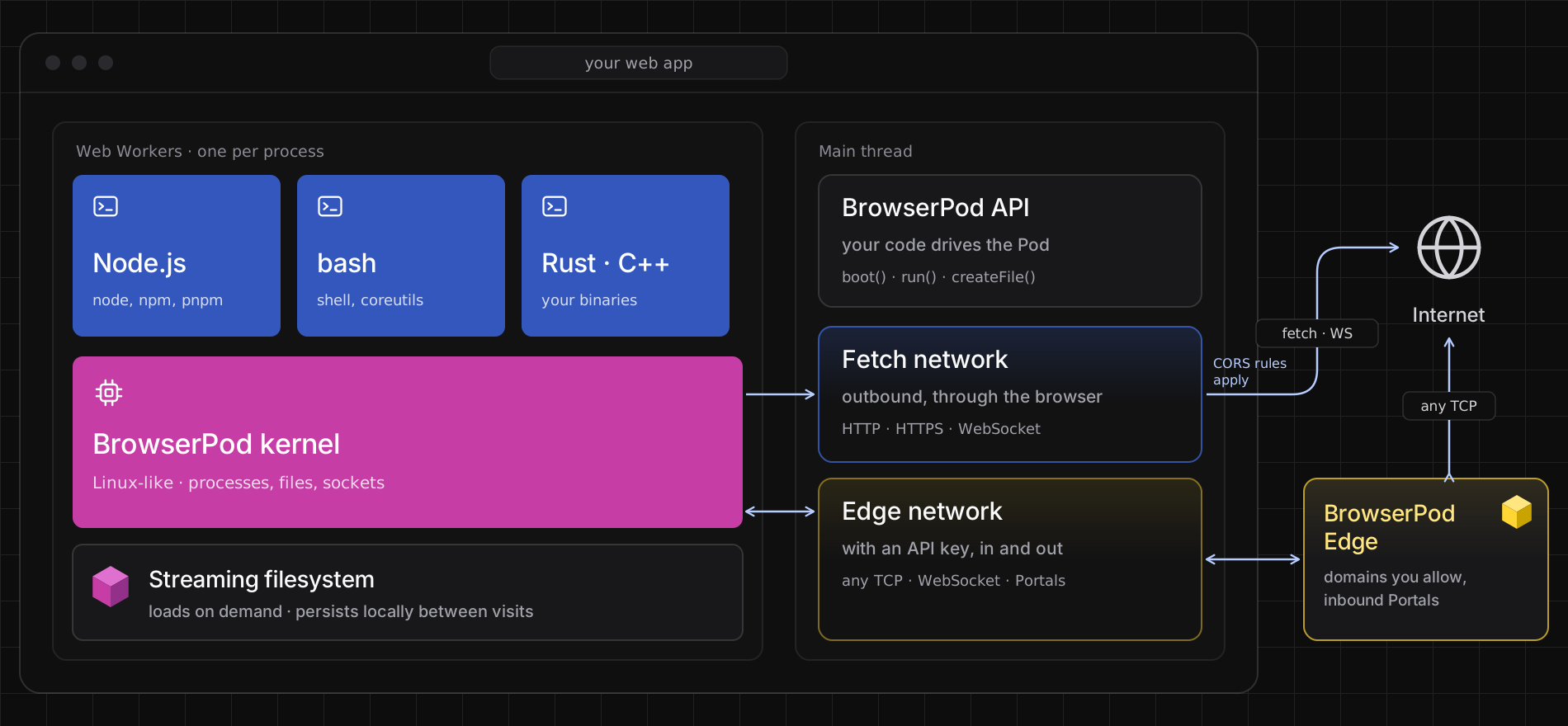
Choose your path

- Run code an agent writes. Write the files into a Pod, run them, and read the output back. Start with Write files to the Pod and Run programs in a Pod, and use a custom terminal to capture what they print.
- Build an in-browser IDE or playground. Install packages with npm, start a dev server and preview it live. Follow the npm project tutorial, which installs a project’s dependencies and previews its server through a Portal, and keep the user’s work across visits with a storage key.
- Run your own compiled programs. Build a Rust program for BrowserPod on your machine, copy the binary into a Pod and run it. Start with Installing the Rust toolchain.
Quick start
- Get a free BrowserPod Edge key: sign in at https://console.browserpod.io
 with your GitHub account and create an API key. With Edge, everything works: npm, GitHub and the other allowed domains, and Portals for servers running in your Pod.
- Add an element for the terminal, boot a Pod and start a shell:
<div id="console"></div>import { BrowserPod } from "@leaningtech/browserpod";
const pod = await BrowserPod.boot({ apiKey: "your-key" });const terminal = await pod.createDefaultTerminal( document.querySelector("#console"));await pod.run("bash", [], { terminal });- Serve the page with the COOP and COEP headers. See Serve your page cross-origin isolated.
bootstarts a Pod. With an API key it boots on the Edge network; without one, on the browser’sfetch().createDefaultTerminalshows a terminal in the element you pass.runruns a program in the Pod, here an interactive bash shell.
How BrowserPod works
- Your page boots a Pod. The npm package loads the runtime and a Linux-like kernel, which start near-instantly. Disk images stream in blocks as programs need them, so a Pod starts before the whole image has downloaded.
- The Pod runs real programs. Node.js, bash, git and the other programs are compiled to WebAssembly against Linux system calls. Node.js is the real Node.js, not a JavaScript reimplementation. The browser’s own engine runs them, with each process in its own Web Worker.
- Everything stays on the user’s device. File changes stay in the browser, and persist across sessions when you boot with a
storageKey. A Pod reaches the internet through the browser’sfetch(), or through BrowserPod Edge, which also gives servers in the Pod a public URL: a Portal.
What BrowserPod supports
| Applications | Node.js 22, Rust and C++. Python in preview. Go is coming soon, and Ruby will follow |
| Environment | npm, pnpm, git, bash and standard command-line tools |
| Your programs | Rust programs compiled with the BrowserPod Rust toolchain |
| Files | A filesystem streamed on demand, kept in the browser, and persisted with a storageKey |
| Networking | HTTP, HTTPS and WebSocket through the browser; Portals and TCP to allowed domains with BrowserPod Edge |
| Browsers | Works on all major browsers, desktop and mobile: Chrome, Edge, Firefox and Safari 27+. Works best in Chromium-based browsers |
| Hosting | A cross-origin isolated page, served with the COOP and COEP headers |
| Not supported | Prebuilt native binaries from npm packages; use Wasm alternatives |
Run it in the tab. Add Edge when it needs the network.
Every Pod runs in the user’s tab, with no account and no API key, and reaches the internet through the browser. When your app needs more, boot the Pod with an API key and its traffic goes through BrowserPod Edge, our network service: it reaches the domains you allow without CORS limits, carries any TCP connection, and lets the internet reach servers in the Pod through Portals.
| BrowserPod | BrowserPod Edge | |
|---|---|---|
| What it is | The microVM: its kernel, filesystem, processes and terminals | The network service that connects your Pods to the internet |
| Outbound | HTTP, HTTPS and WebSocket through the browser, to servers that allow CORS | Any TCP, including HTTP and WebSocket, to the domains you allow, without CORS limits |
| Inbound | Not yet | Portals: public URLs for servers in the Pod |
| Account | None | BrowserPod console, with GitHub sign-in |
See Networking for the details, and BrowserPod Edge to get a key.
Using a coding agent?
Give your agent this prompt:
Use the BrowserPod skill (https://browserpod.io/skills/browserpod/SKILL.md
Or install the skill:
npx skills add leaningtech/skills --skill browserpodOr point your agent at browserpod.io/agents.md or browserpod.io/docs/llms.txt.
Licensing
BrowserPod is free for any use, including commercial use, under the BrowserPod Community Licence. Only BrowserPod Edge is metered, and Edge Free covers up to 1,000 connected hours a month. Self-hosting needs an Enterprise Licence. See Licensing for the plans and terms.
Getting help
| Where | Best for |
|---|---|
| Discord | Questions, help getting started, and showing what you built |
| GitHub issues | Bugs in BrowserPod |
| BrowserPod console | Your API keys, allowed domains and Edge usage |
Before you report a bug, read Debugging BrowserPod and the FAQ.